Term History
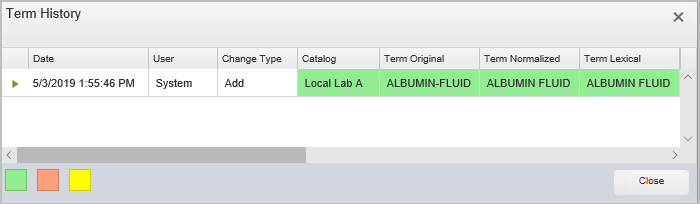
The Term History form allows you to view historic details on changes made to term attributes within Symedical. To access:
-
In Map Manager, double-click the desired source term to open Term Details.
-
Click Term History at the bottom of the window.
All changes (add, change, or delete) are listed within the Term History grid according to the date of change with the most recent change at the top. Within the grid, fields containing a background color identify the affected attribute and the change that was made. Green indicates an addition, yellow indicates a change, and salmon indicates a deletion, as noted at the bottom of the form.
Please Note: Columns displayed within the grid vary according to the attributes assigned.
See the following table for descriptions of the primary set of history fields.
|
Column Name |
Description |
|
Catalog |
Displays the name of the catalog that contains the term. |
|
Change Type |
Indicates if the term record was added, changed, or deleted. |
|
Date |
Displays the date and time the change was made and added to history. |
|
Domain Level |
Displays the Domain Level associated to the term. |
|
Effective Date |
Displays the date the term was made active in the source data. |
|
Hierarchy Parent Term |
Displays the parent term if a relationship is defined. |
|
Incidence Count |
When defined, displays the number of times a term occurs within a user-defined set of data. |
|
MT Code |
When defined, displays the term's unique UMLS® (Unified Medical Language System®) Metathesaurus® or RxNorm code. |
|
Obsolete Date |
When applicable, displays the date the term was made inactive in the source data. |
|
Preferred |
When defined, displays the term’s preferred status of Yes (preferred) or No (not preferred). |
|
Recognized |
Displays the term’s recognition status in Symedical runtime services of Yes (recognized) or No (not recognized). |
|
Replacement Term |
When applicable, displays the description of the replacement term. |
|
Source Code |
|
|
Source Term Type |
Displays the source identifier associated to the term. |
|
Status |
Displays whether the term is active or retired. |
|
Submitted |
Displays the term’s publication status of Yes (submitted) or No (not submitted). |
|
Term Lexical |
Displays the term’s parsed lexical description. |
|
Term Normalized |
Displays the term’s parsed normalized description. |
|
Term Original |
Displays the term description. |
|
Term Phonetic |
Displays the term’s parsed phonetic description. |
|
Term Tokenized |
Displays the term’s parsed tokenized description. |
|
Unique Code |
When defined, displays the unique identifier for the term. |
|
User |
Name of user who made the change. |
|
Warehouse Sync Key |
When defined, displays the value used to synchronize a term with a local code value. |