Modify Qualifier Code List or Term Type
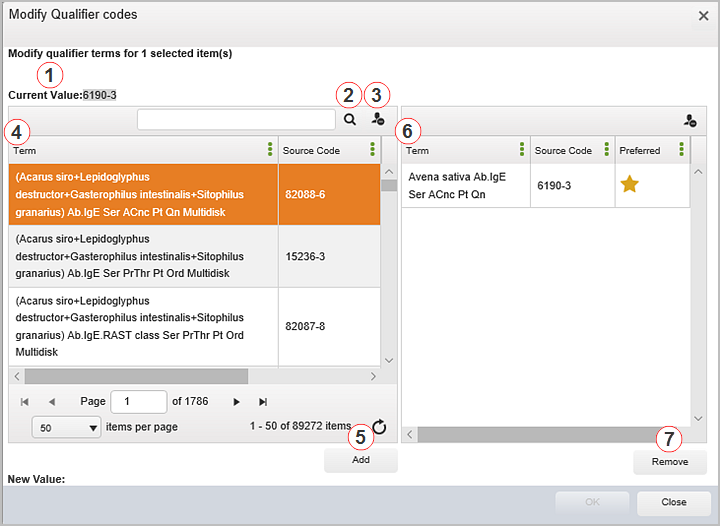
The Modify Qualifier Code List or Term Type form allows you to modify the following types of map qualifier values defined in Symedical:
-
Code list type map qualifiers
-
Term type map qualifier values not formatted to be presented as a list
The form is used to search for and select the desired term or source code qualifier value from a catalog defined in Symedical. The form varies depending on the qualifier type value to be edited. This topic shows modifying a code list type qualifier, which allows for multiple values to be selected and displayed within the Map Manager grid.
To access, from Map Manager:
-
Select a mapped term or multiple mapped terms.
-
Right-click and select Edit Qualifiers or click Edit Qualifiers from the Term menu to open the Modify Qualifiers form.
-
Click within the map qualifier value fields for the types defined above and then click
 to open the Map Qualifier Code List or Term Type form.
See the table below for field descriptions.
|
Item |
Description |
|
1 |
Current Value — Displays the map qualifier value currently displayed in the Map Manager grid. |
|
2 |
Search — Enter criteria and click |
|
3 |
Reset Grid Settings — Click |
|
4 |
Available Values Pane — Displays the list of map qualifier values available for selection. |
|
5 |
Add — Click to add a selected value from the Available Values Pane to the New Values Pane. |
|
6 |
New Values Pane — Displays the values selected from the Available Values Pane. |
|
7 |
Remove — Click to remove a selected value from the New Values Pane. |
|
8 |
New Value — Displays the new map qualifier value(s) selected to appear in the Map Manager grid. |
 to initiate a term contains search for the desired qualifier value.
  to return search and column filters to their defaults.